
MP3 Player Application
Overview
A standalone JavaFX MP3 player designed as a full desktop application with a classic hi-fi component aesthetic. This project focuses on combining reliable playback logic with a carefully designed interface, resulting in a polished media player that feels closer to a physical hi-fi unit than a generic software tool.
Project Approach
The goal of this project was to build a complete, self-contained media player that goes beyond basic playback functionality. Rather than relying on default components or minimal layouts, the emphasis was placed on structure, modular design, and a deliberate visual identity inspired by traditional hi-fi equipment.
The application was designed as the first standalone module in a larger, modular media player concept, allowing functionality and interface elements to be reused or extended in future modules.
Design and Interface Adaptations
From early layout to finished interface
Initial versions of the application focused on layout structure and core playback functionality. As the project evolved, the interface was refined to better reflect a physical hi-fi component, with clearer separation of controls, improved spacing, and a more cohesive visual hierarchy.
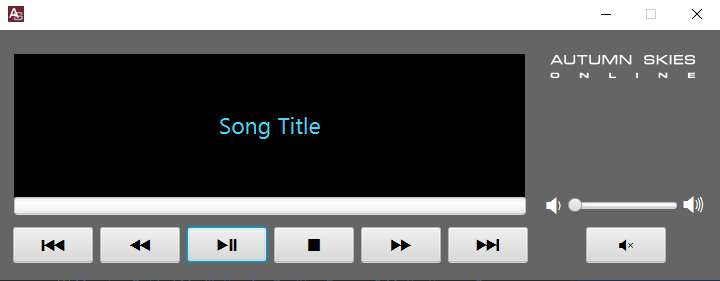
Early Layout And Initial Interface Design
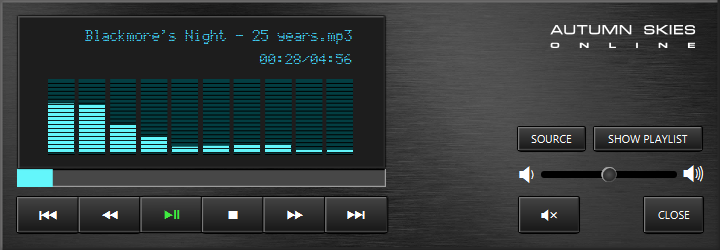
Final Media Player interface
Visual styling and feedback
The interface styling was developed to feel tactile and responsive without becoming visually distracting. This included the use of a brushed-metal background, custom control icons, and subtle visual feedback for button interaction and playback state.
Animated equaliser bars were added to provide real-time visual feedback during playback, reinforcing the connection between audio output and the interface.

Creation Of Vector Elements For Font Media Font

Final Font Set Created In FontForge
Visual Feedback And Interaction
To replicate the feel of a physical calculator display, visual feedback was carefully refined. This included subtle glow effects, button states, and spacing adjustments to ensure the interface feels responsive without being visually distracting.
Display and custom assets
Custom fonts and icons were designed specifically for this project to ensure consistency across the interface. These assets were integrated directly into the JavaFX application and styled using CSS, allowing visual elements to remain flexible and maintainable as the interface evolved.
What This Project Demonstrates
-
Building a full-featured desktop media player using Java and JavaFX
-
Applying modular design principles to support future expansion
-
Integrating audio playback, playlists, and user interaction cleanly
-
Designing and styling a cohesive interface using custom assets and CSS
-
Combining logic, layout, and visual feedback into a single, polished application
Project Links
MP3 Player Application
Overview
A standalone JavaFX MP3 player designed as a full desktop application with a classic hi-fi component aesthetic. This project focuses on combining reliable playback logic with a carefully designed interface, resulting in a polished media player that feels closer to a physical hi-fi unit than a generic software tool.
Project Approach
The goal of this project was to build a complete, self-contained media player that goes beyond basic playback functionality. Rather than relying on default components or minimal layouts, the emphasis was placed on structure, modular design, and a deliberate visual identity inspired by traditional hi-fi equipment.
The application was designed as the first standalone module in a larger, modular media player concept, allowing functionality and interface elements to be reused or extended in future modules.
Design and Interface Adaptations
From early layout to finished interface
Initial versions of the application focused on layout structure and core playback functionality. As the project evolved, the interface was refined to better reflect a physical hi-fi component, with clearer separation of controls, improved spacing, and a more cohesive visual hierarchy.
Early Layout And Initial Interface Design
Final Media Player interface
Visual styling and feedback
The interface styling was developed to feel tactile and responsive without becoming visually distracting. This included the use of a brushed-metal background, custom control icons, and subtle visual feedback for button interaction and playback state.
Animated equaliser bars were added to provide real-time visual feedback during playback, reinforcing the connection between audio output and the interface.
Creation Of Vector Elements For Font Media Font
Final Font Set Created In FontForge
Visual Feedback And Interaction
To replicate the feel of a physical calculator display, visual feedback was carefully refined. This included subtle glow effects, button states, and spacing adjustments to ensure the interface feels responsive without being visually distracting.
Display and custom assets
Custom fonts and icons were designed specifically for this project to ensure consistency across the interface. These assets were integrated directly into the JavaFX application and styled using CSS, allowing visual elements to remain flexible and maintainable as the interface evolved.
What This Project Demonstrates
-
Building a full-featured desktop media player using Java and JavaFX
-
Applying modular design principles to support future expansion
-
Integrating audio playback, playlists, and user interaction cleanly
-
Designing and styling a cohesive interface using custom assets and CSS
-
Combining logic, layout, and visual feedback into a single, polished application
Project Links