
Calculator Application
Overview
A retro-style desktop calculator built as a standalone JavaFX application, inspired by the classic Casio Personal M-1 calculator. This project marked my transition from structured Java coursework into building complete, visually polished desktop applications, combining application logic, interface design, and attention to detail into a finished product.
Project Approach
The aim of this project was to recreate a familiar physical calculator as a functional desktop application while staying faithful to its original look and behaviour. Unlike coursework examples, this required translating a static, physical object into an interactive interface that behaves intuitively on a desktop system.
The work involved analysing the original device, rebuilding its layout digitally, and making practical design adjustments where necessary to ensure usability, accuracy, and visual consistency within a resizable application window.
Design and Interface Adaptations
From Physical Device To Desktop Layout
The original calculator was scanned and used as a reference to recreate proportions, spacing, and overall layout. Some elements required subtle adjustment to function correctly in a desktop environment while preserving the character of the original device.
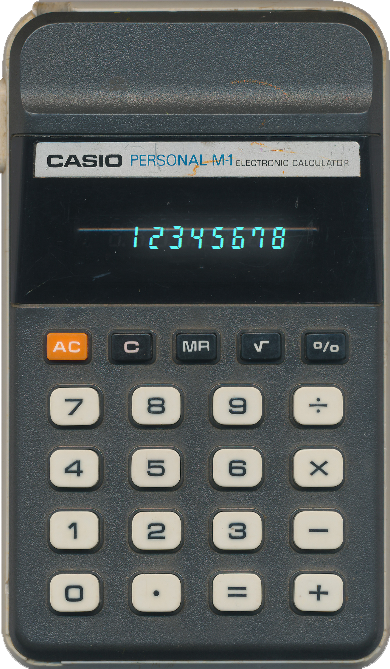
Original Physical Calculator
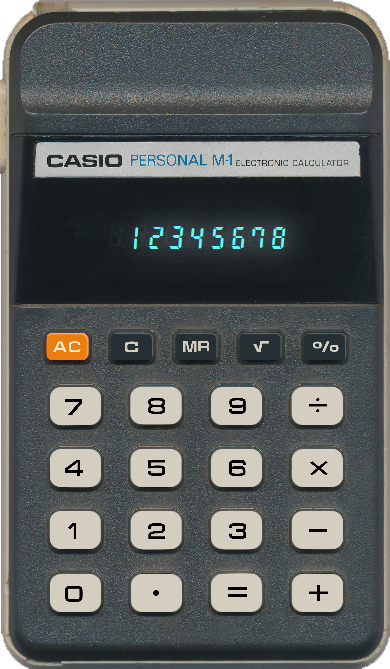
JavaFX Recreation Of The Calculator Layout
Display And Digit Refinement
Early versions of the application used standard system fonts, which proved insufficient for achieving consistent spacing and correct alignment—particularly around the decimal point. To solve this, a custom font was designed and integrated to ensure precise digit width and accurate display behaviour.

Original Calculator Display

Matching Font Recreated With CorelDRAW/FontForge
Visual Feedback And Interaction
To replicate the feel of a physical calculator display, visual feedback was carefully refined. This included subtle glow effects, button states, and spacing adjustments to ensure the interface feels responsive without being visually distracting.
What This Project Demonstrates
- Building a complete desktop application using Java and JavaFX
- Translating a physical design into a usable digital interface
- Creating and integrating custom assets to solve layout limitations
- Separating application logic, layout, and styling for maintainability
- Packaging and distributing a desktop application as an installable executable
Project Links
Calculator Application
Overview
A retro-style desktop calculator built as a standalone JavaFX application, inspired by the classic Casio Personal M-1 calculator. This project marked my transition from structured Java coursework into building complete, visually polished desktop applications, combining application logic, interface design, and attention to detail into a finished product.
Project Approach
The aim of this project was to recreate a familiar physical calculator as a functional desktop application while staying faithful to its original look and behaviour. Unlike coursework examples, this required translating a static, physical object into an interactive interface that behaves intuitively on a desktop system.
The work involved analysing the original device, rebuilding its layout digitally, and making practical design adjustments where necessary to ensure usability, accuracy, and visual consistency within a resizable application window.
Design and Interface Adaptations
From Physical Device To Desktop Layout
The original calculator was scanned and used as a reference to recreate proportions, spacing, and overall layout. Some elements required subtle adjustment to function correctly in a desktop environment while preserving the character of the original device.
Original Physical Calculator
JavaFX Recreation Of The Calculator Layout
Display And Digit Refinement
Early versions of the application used standard system fonts, which proved insufficient for achieving consistent spacing and correct alignment – particularly around the decimal point. To solve this, a custom font was designed and integrated to ensure precise digit width and accurate display behaviour.
Original Calculator Display
Matching Font Recreated With CorelDRAW/FontForge
Visual Feedback And Interaction
To replicate the feel of a physical calculator display, visual feedback was carefully refined. This included subtle glow effects, button states, and spacing adjustments to ensure the interface feels responsive without being visually distracting.
What This Project Demonstrates
- Building a complete desktop application using Java and JavaFX
- Translating a physical design into a usable digital interface
- Creating and integrating custom assets to solve layout limitations
- Separating application logic, layout, and styling for maintainability
- Packaging and distributing a desktop application as an installable executable
Project Links